

STEP 1: Create an Assignment Folder in Panopto
- In your Canvas course, click on “Panopto Video” in the course navigation.
- At the top right, click the Settings icon (gear icon).
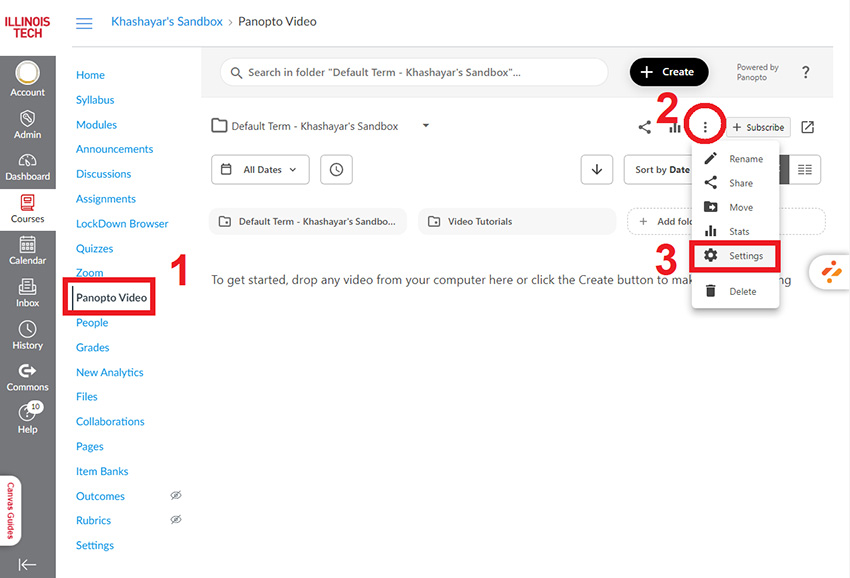
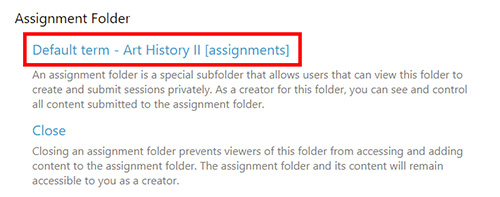
- In the Settings window, click on the “Create Assignment Folder” button.
- The folder will be created with the course name and "Assignments" appended. Students can now upload videos to this folder through Assignments.
STEP 2: Create the Assignment in Canvas
- Go to “Assignments” in the course navigation.
- Click the “+Assignment” button.
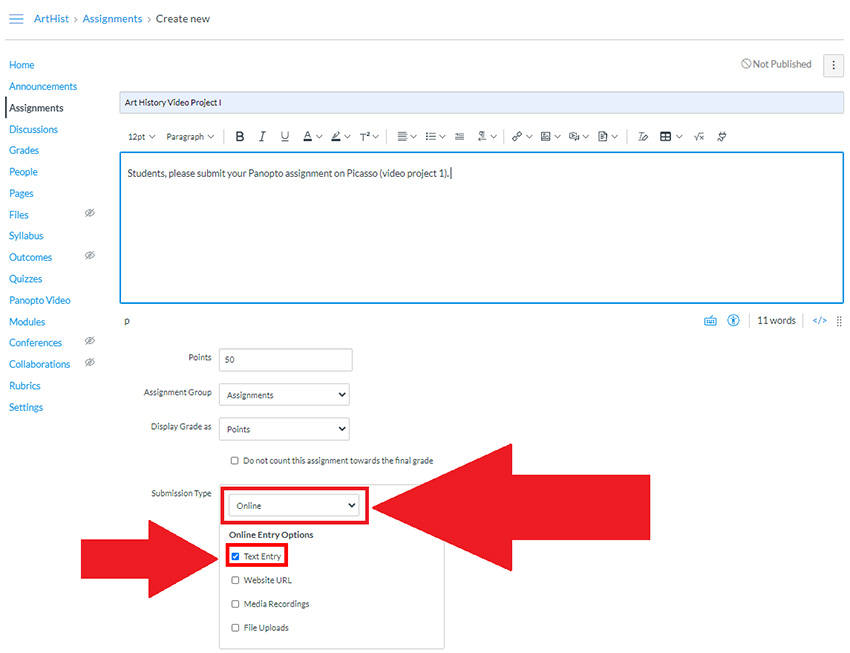
- Give your assignment a Name and provide Instructions for students to submit their Panopto video.
- Set the Submission Type to “Online” and select “Text Entry”.
- Provide instructions to students on how to use Panopto. In addition to the instructions for the assignment itself, we recommend adding this link: https://www.iit.edu/cli/online-learning-students/media-assignments.
- Suggested language: Students: Learn more about how to submit a video assignment.
- Set the rest of the assignment details (due date, points, etc.).
- Click “Save & Publish” when you're ready.
For more information, visit Panopto website.