

After creating the outcomes at the desired subaccount level, it’s necessary to create rubrics from the outcomes. Rubrics are necessary for assessments that will be evaluated for assessment and accreditation purposes, and they also make it very easy for instructors to assess how well the student has achieved the outcome.
Rubrics created at the subaccount level will only be available to courses within the subaccount listed. For example, rubrics created in “Business Administration” will only be available to courses within the Stuart School of Business subaccount.
- As an admin, go to the desired subaccount
- Click on “Rubrics”
- Name the rubric (Recommended: enter the name of the outcome you are assessing)
- Select the type (Recommended: Scale)
- Select the rating order (High-to-low or low-to-high)
- Select the scoring option for “Scored”—this score refers to the score that appears on the system report (generally between 3–0)
- Click “Create from Outcome”
- Navigate to the desired outcome
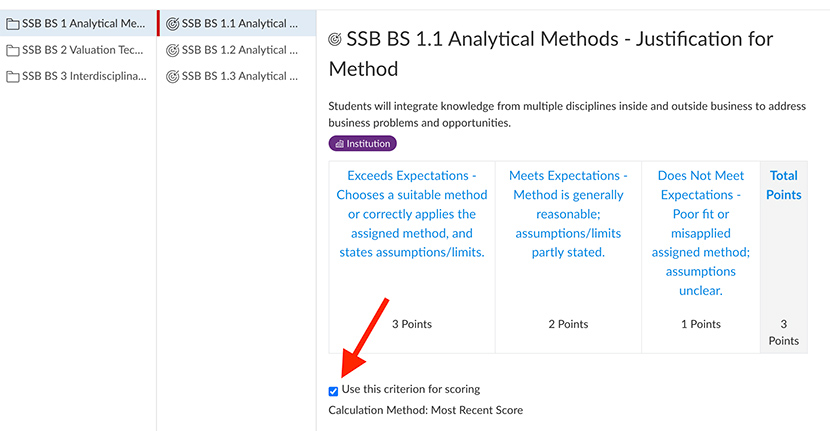
- CHECK “Use This Criterion for Scoring”—again, this refers to the score that is on the system report and NOT the score that the student might receive on the assessment itself
- Press "Import"
- Repeat “Create from Outcome” until all desired outcomes are included
- Press "Create Rubric" when all the desired outcomes have been selected