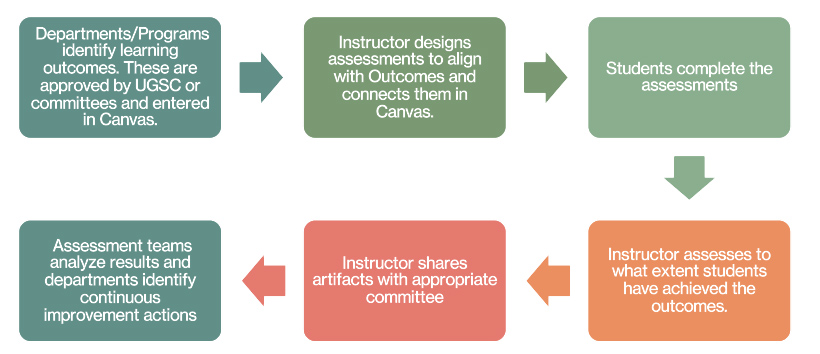
Designated staff or faculty can be outcomes administrators to manage and maintain outcomes in Canvas for a department or program. That person or persons will work with the Center for Learning Innovation to build outcomes and rubrics in Canvas for assessment purposes. They will have the ability to pull outcomes reports for review and analysis.
To begin the process of becoming an outcomes administrator, please send an email to supportdesk@illinoistech.edu.
Before You Start
- Canvas is built on “subaccounts”. These subaccounts are invisible to the majority of users; however, the subaccounts are important to remember as you begin creating outcomes. Outcomes are made available in the subaccount in which they are created. In other words, an outcome that applies to the entire university should be made available at the “institution level” of the account, or, if it should be made available to only a school/college or department, the outcome should be created in the desired subaccount and will ONLY be available to courses within that subaccount.
- Naming conventions. It’s important to create outcome names that are short, succinct, and recognizable. Take advantage of the descriptions to provide more information.
- Create groups to make searching for outcomes easier.
- Use the friendly description—these will appear on the student’s gradecenter page in Canvas.
- Deletions. It is advised to never delete outcomes so that you don’t lose the associated reports or information. If an outcome is no longer active/needed, it is recommended to change the name to “Do Not Use [Outcome Name]” or provide a “COMPLETE/[Outcome Name].”